The Tada App uses a smart algorithm to detect when your users are about to leave and show your widget.
On desktop, Tada will show your widget when a visitor is heading to the top section of their browser to exit your page.
On mobile, Tada will monitor scrolling behaviour, idle time and phone specific gestures to show your widget when users are about to leave.
To enable Exit Intent, head to the Widget section of the Widget Creation / Edit menu and enable those two options:
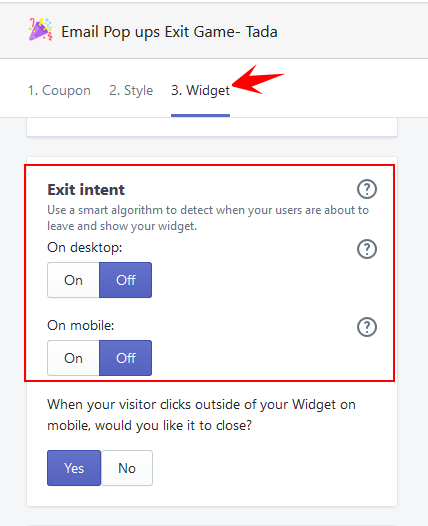
One important side note is that Exit intent will only show the Widget if it hasn't shown previously using any other triggers. We will not show the Widget twice in the same page view.
This means that if you'd like to only show your Widget using the Exit intent trigger, you'll also want to massively increase the time delay for the Widget (so that it's the Exit Intent that gets triggered first). Here's how you can do this:
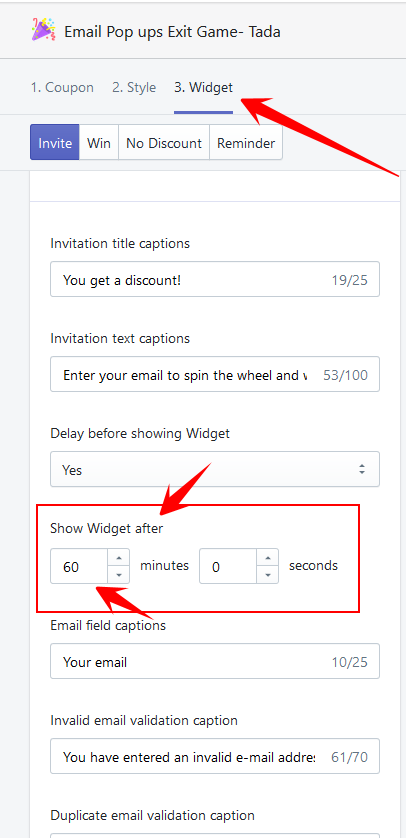
PS: It is not currently possible to show one Widget when landing on the page and a different Widget as Exit Intent. Tada has a 1 Widget active per page limit at all time to reduce friction with users.